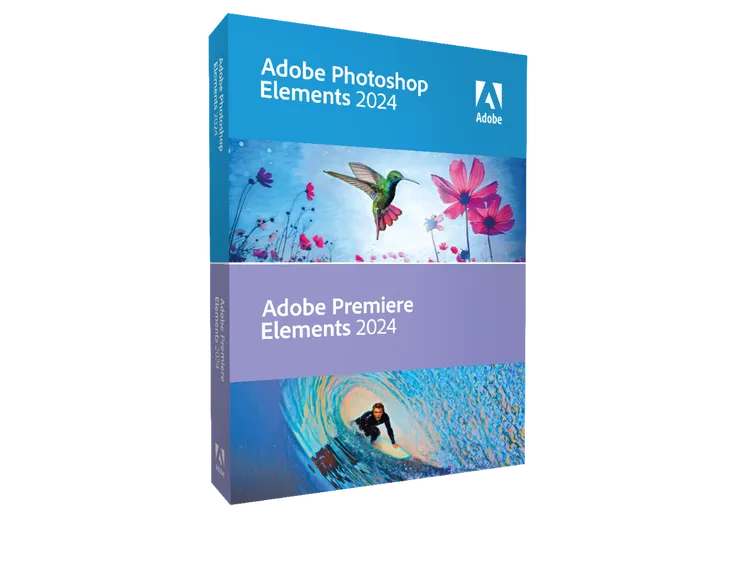
Adobe Photoshop Elements 2024 & Premiere Elements 2024
Adobe Photoshop Elements 2024 & Premiere Elements 2024 / Adobe Photoshop Elements 2024 & Premiere Elements 2024 Adobe 簡介 / Overview Adobe Photoshop Elements 2024 & Premiere Elements 2024 是 Adobe 最新發布的消費級圖片和影片編輯軟體套件。這次更新包含多個由 Adobe AI 驅動的新功能、全新的編輯體驗和全新外觀,讓從快速修圖到全面變革都比以往更容易。隨著逐步操作的引導編輯,您可以邊做邊學,並使用照片輪播、精選輪播、幻燈片、拼貼、動態標題、動態社交貼文等模板開啟您的創意之旅。Photoshop Elements 2024 包含 62 個引導編輯,Premiere Elements 2024 包含 26 個引導編輯。兩個軟體都支援明暗模式切換,提供現代化的使用者介面。 Adobe Photoshop Elements 2024 & Premiere Elements 2024 is the latest release of Adobe's consumer-friendly photo and video editing software suite. This latest release includes new AI-powered features and a new editing experience with a fresh look, so it's easier than ever to go from quick fixes to total transformations. Learn as you go with step-by-step Guided Edits and kickstart your creative journey with templates for Photo Reels, Highlight Reels, slideshows, collages, motion titles, animated social posts, and more. Photoshop Elements 2024 includes 62 Guided Edits, while Premiere Elements 2024 includes 26 Guided Edits. Both applications feature light and dark mode options with a modernized user interface. 主要特點 / Key Features Photo Reels — 創建並分享快速移動的照片輪播,每張照片都有自己的文字、效果和圖形,可導出為 MP4 或 GIF 以便在各種社交平台上輕鬆分享。 Highlight Reels — AI 自動化快速生成精選輪播,專注於動作、特寫和最高品質的鏡頭,創建引人入勝的影片。 Match Color and Tone — 匹配顏色和色調以創造全新氛圍,可選擇內置預設或使用自己的照片,點擊一次即可調整色相、飽和度和亮度。 One-Click Quick Actions — 一鍵照片快速修復,包括模糊或移除背景、平滑皮膚、去霧、色彩化照片等,以及 AI 驅動的 JPEG 疵點移除功能,增強壓縮 JPEG 的品質。 Automatic Selections — 由 Adobe AI 驅動的自動選擇功能,讓輕鬆增強或替換照片的特定區域,如天空或背景,簡化局部編輯或合成。 62 Guided Edits (Photoshop Elements) — 62 個逐步引導編輯,包括創建風格化照片文字、替換背景、完美風景等,幫助您快速掌握編輯技巧。 26 Guided Edits (Premiere Elements) — 26 個逐步引導編輯,包括快速修復、添加創意效果、平滑過渡、吸引人的動畫等。 Adobe Stock Photos — 免費訪問數千張 Adobe Stock 照片,用於新背景、拼貼或創作啟發人心的圖形。 Artistic Effects — 由 Adobe AI 驅動,一鍵添加受著名藝術作品或流行藝術風格啟發的效果,將照片轉化為藝術品。 Audio Effects — 新增音頻效果如混響、人聲增強器和去嗡嗡聲,提升影片聽覺體驗。 Modern Graphics — 新的現代圖形,強調關鍵時刻或添加視覺糖果,讓影片更加生動。 Fresh UI Design — 全新的編輯體驗,現代化的字體、圖標、按鈕和顏色,提供明暗模式選擇,讓眼睛更舒適。 Web & Mobile Companion Apps — 網頁和移動配套應用程式(目前僅提供英語測試版),支持創意疊加層、一鍵照片修復和跨 Elements Organizer 自動同步照片和影片。 規格 / Specifications 作業系統 / Operating SystemWindows 10 (version 22H2) 或 Windows 11 (version 22H2),64-bit 版本;不支援 Windows 7、Windows 8.1 作業系統 / Operating SystemWindows 10 (version 22H2) or Windows 11 (version 22H2), 64-bit versions only; Windows 7, Windows 8.1 not supported 處理器 / ProcessorIntel 6th Generation 或更新,或 AMD 同級處理器 處理器 / ProcessorIntel 6th Generation or newer processor or AMD equivalent 記憶體 / RAM8GB RAM(建議 16GB 或以上) 記憶體 / RAM8GB of RAM (16GB or more recommended) 硬碟空間 / Hard Disk Space10GB 可用硬碟空間 硬碟空間 / Hard Disk Space10GB of available hard-disk space 顯示卡 / GraphicsDirectX 12 相容顯卡 顯示卡 / GraphicsDirectX 12 compatible graphics 顯示器 / Display1280 x 800 解析度 顯示器 / Display1280 x 800 display resolution 授權 / License永久授權,無需訂閱 授權 / LicensePerpetual license, no subscription required 定價 / Pricing單獨購買每套 $99,升級價 $79;套裝(兩套)$150,升級價 $120 定價 / Pricing$99 each for new users, $79 to upgrade; bundle $150 (or $120 as an upgrade) 語言 / Language支援多種語言 語言 / LanguageMultiple languages supported AI 功能 / AI FeaturesAdobe AI 驅動的自動選擇、色彩匹配、JPEG 疵點移除等 AI 功能 / AI FeaturesAdobe AI-powered automatic selections, color match, JPEG artifact removal, and more 匯出格式 / Export Formats照片:JPG、PNG、GIF、MP4;影片:MP4、MOV、AVI 等 匯出格式 / Export FormatsPhoto: JPG, PNG, GIF, MP4; Video: MP4, MOV, AVI, etc. Source: Adobe Blog
HKD $1499
Adobe Photoshop Elements 2024 & Premiere Elements 2024
Adobe Photoshop Elements 2024 & Premiere Elements 2024 / Adobe Photoshop Elements 2024 & Premiere Elements 2024
Adobe
簡介 / Overview
Adobe Photoshop Elements 2024 & Premiere Elements 2024 是 Adobe 最新發布的消費級圖片和影片編輯軟體套件。這次更新包含多個由 Adobe AI 驅動的新功能、全新的編輯體驗和全新外觀,讓從快速修圖到全面變革都比以往更容易。隨著逐步操作的引導編輯,您可以邊做邊學,並使用照片輪播、精選輪播、幻燈片、拼貼、動態標題、動態社交貼文等模板開啟您的創意之旅。Photoshop Elements 2024 包含 62 個引導編輯,Premiere Elements 2024 包含 26 個引導編輯。兩個軟體都支援明暗模式切換,提供現代化的使用者介面。
Adobe Photoshop Elements 2024 & Premiere Elements 2024 is the latest release of Adobe's consumer-friendly photo and video editing software suite. This latest release includes new AI-powered features and a new editing experience with a fresh look, so it's easier than ever to go from quick fixes to total transformations. Learn as you go with step-by-step Guided Edits and kickstart your creative journey with templates for Photo Reels, Highlight Reels, slideshows, collages, motion titles, animated social posts, and more. Photoshop Elements 2024 includes 62 Guided Edits, while Premiere Elements 2024 includes 26 Guided Edits. Both applications feature light and dark mode options with a modernized user interface.
主要特點 / Key Features
Photo Reels — 創建並分享快速移動的照片輪播,每張照片都有自己的文字、效果和圖形,可導出為 MP4 或 GIF 以便在各種社交平台上輕鬆分享。
Highlight Reels — AI 自動化快速生成精選輪播,專注於動作、特寫和最高品質的鏡頭,創建引人入勝的影片。
Match Color and Tone — 匹配顏色和色調以創造全新氛圍,可選擇內置預設或使用自己的照片,點擊一次即可調整色相、飽和度和亮度。
One-Click Quick Actions — 一鍵照片快速修復,包括模糊或移除背景、平滑皮膚、去霧、色彩化照片等,以及 AI 驅動的 JPEG 疵點移除功能,增強壓縮 JPEG 的品質。
Automatic Selections — 由 Adobe AI 驅動的自動選擇功能,讓輕鬆增強或替換照片的特定區域,如天空或背景,簡化局部編輯或合成。
62 Guided Edits (Photoshop Elements) — 62 個逐步引導編輯,包括創建風格化照片文字、替換背景、完美風景等,幫助您快速掌握編輯技巧。
26 Guided Edits (Premiere Elements) — 26 個逐步引導編輯,包括快速修復、添加創意效果、平滑過渡、吸引人的動畫等。
Adobe Stock Photos — 免費訪問數千張 Adobe Stock 照片,用於新背景、拼貼或創作啟發人心的圖形。
Artistic Effects — 由 Adobe AI 驅動,一鍵添加受著名藝術作品或流行藝術風格啟發的效果,將照片轉化為藝術品。
Audio Effects — 新增音頻效果如混響、人聲增強器和去嗡嗡聲,提升影片聽覺體驗。
Modern Graphics — 新的現代圖形,強調關鍵時刻或添加視覺糖果,讓影片更加生動。
Fresh UI Design — 全新的編輯體驗,現代化的字體、圖標、按鈕和顏色,提供明暗模式選擇,讓眼睛更舒適。
Web & Mobile Companion Apps — 網頁和移動配套應用程式(目前僅提供英語測試版),支持創意疊加層、一鍵照片修復和跨 Elements Organizer 自動同步照片和影片。
規格 / Specifications
作業系統 / Operating SystemWindows 10 (version 22H2) 或 Windows 11 (version 22H2),64-bit 版本;不支援 Windows 7、Windows 8.1
作業系統 / Operating SystemWindows 10 (version 22H2) or Windows 11 (version 22H2), 64-bit versions only; Windows 7, Windows 8.1 not supported
處理器 / ProcessorIntel 6th Generation 或更新,或 AMD 同級處理器
處理器 / ProcessorIntel 6th Generation or newer processor or AMD equivalent
記憶體 / RAM8GB RAM(建議 16GB 或以上)
記憶體 / RAM8GB of RAM (16GB or more recommended)
硬碟空間 / Hard Disk Space10GB 可用硬碟空間
硬碟空間 / Hard Disk Space10GB of available hard-disk space
顯示卡 / GraphicsDirectX 12 相容顯卡
顯示卡 / GraphicsDirectX 12 compatible graphics
顯示器 / Display1280 x 800 解析度
顯示器 / Display1280 x 800 display resolution
授權 / License永久授權,無需訂閱
授權 / LicensePerpetual license, no subscription required
定價 / Pricing單獨購買每套 $99,升級價 $79;套裝(兩套)$150,升級價 $120
定價 / Pricing$99 each for new users, $79 to upgrade; bundle $150 (or $120 as an upgrade)
語言 / Language支援多種語言
語言 / LanguageMultiple languages supported
AI 功能 / AI FeaturesAdobe AI 驅動的自動選擇、色彩匹配、JPEG 疵點移除等
AI 功能 / AI FeaturesAdobe AI-powered automatic selections, color match, JPEG artifact removal, and more
匯出格式 / Export Formats照片:JPG、PNG、GIF、MP4;影片:MP4、MOV、AVI 等
匯出格式 / Export FormatsPhoto: JPG, PNG, GIF, MP4; Video: MP4, MOV, AVI, etc.
Source: Adobe Blog
1499